What Is Technical SEO? All Technical SEO Services Explained

Google can’t rank a website well if it cannot crawl, render or index it. Technical SEO addresses that challenge.
Technical SEO covers the infrastructure and configuration work that sits underneath your website’s content and links. Google then decides whether all the effort your business puts into keywords, copy and backlinks ever gets the chance to show up in search results or AI overviews at all.
We’ll explain what technical SEO is, why you should care and every major type of task that falls under it… From crawlability and site speed, through to structured data and international targeting.
Quick summary: Technical SEO
- Technical SEO means optimising your site’s infrastructure so search engines can crawl, render and index it properly, giving visitors a fast, secure and accessible experience.
- Google dominates online search market share, so getting technical SEO right for Google matters more than any other search engine.
- Every page needs to pass through four stages: crawling, rendering, indexing and ranking.
- Mobile now drives the majority of searches, so Google evaluates your site’s mobile version first when deciding how to rank it.
- Technical SEO covers crawlability, indexability, site speed, mobile-friendliness, security, structured data, rendering and more.
- It often delivers the fastest visible improvement in rankings because it removes barriers rather than building new authority from scratch.
What is technical SEO?
Technical SEO is about optimising the infrastructure so that search engines can crawl your site then render and index its pages efficiently. That way, your visitors get a fast, secure and accessible experience once they arrive.
It sits alongside two other pillars of SEO:
- On-page SEO covers content, keywords, headings and internal messaging.
- Off-page SEO covers backlinks, brand mentions and external signals.
- Technical SEO covers the underlying mechanics: site architecture, code, server configuration and performance.
A site can have excellent content and a strong backlink profile and still fail to rank if search engines cannot access or understand it properly.
Why your website needs good technical SEO
Google and other search engines follow a four-step process to get a page into search results: crawling, rendering, indexing and ranking. See how Search works according to Google for more details.
Google has 91.31% of the search engine market share according to StatCounter, with Bing next on only 4.47%, as of July 2026.
A site with crawl errors, slow load times, or duplicate content problems will waste budget on content and marketing that won’t have a good chance of ranking well. Conversion rates also suffer independently of rankings, since slow or broken pages lose visitors.
Fixing technical SEO issues often produces some of the fastest visible gains in an SEO programme because the fixes remove barriers rather than trying to build new authority from scratch.
- Crawling: search engine bots (Googlebot, for example) discover URLs by following links, reading sitemaps and revisiting known pages.
- Rendering: the bot processes the page’s HTML, CSS and JavaScript to see the page as a user would.
- Indexing: if the page qualifies, it gets stored in the search engine’s index, making it eligible to appear in results.
- Ranking: indexed pages get evaluated and ordered against a query based on relevance, authority and user experience signals.
Technical SEO work maps closely onto these four stages. Most tasks fix a specific point of failure in this pipeline.
UWP Group technical SEO case studies
International education qualification provider
About our client
- They provide international education qualifications and offer examinations worldwide.
Challenge
- Traffic (total clicks) to the blog was falling throughout 2025 due to several factors.
- SEO performance was likely hindered by technical issues such as broken links, images with large file sizes, failing Google Core Web Vitals and more.
Solution
- We provided a comprehensive site health and SEO audit identifying that 32% of URLs had some type of technical error.
- In addition to optimising 5 old blog posts per month, we provided monthly technical SEO reports providing step-by-step recommendations to address issues identified in the audit.
- The monthly technical SEO reports covered issues such as: author pages carrying a noindex tag, wasted crawl budget, missing H1 tags, oversized images, external links returning 404s and much more.
- We made 26 detailed step-by-step recommendations which the client implemented over 6 months.
Results
- Along with the results from optimised blog posts, which in turn fixed several ad hoc technical SEO issues, impressions and clicks to the blog doubled over 6 months.
- In the 6 months prior to March 5th 2026, the blog received 1.41m impressions. In the 6 months since beginning our technical SEO work, it has received 2.94m impressions.
- And in the 6 months prior, there were 10.3k clicks to the blog. In the 6 months since beginning our technical SEO work, there were 19.5k clicks to the blog.
- After the initial 6 month agreement, the client has extended it for at least a further 6 months.
Bricks&Logic
About our client
- Bricks&Logic provides a free-to-use platform for the general public, letting them see up-to-date property price predictions for 27 million properties in England and Wales.
- In contrast, the Housing Index derived solely from Land Registry data trails the Bricks&Logic House Price Index by 3-4 months.
Challenge
- Traffic (total clicks) to the website was falling sharply in early 2026.
- SEO performance was harmed by technical issues such as rendering bugs, poor page performance and crawl problems.
Solution
- We provided a comprehensive technical SEO audit and prioritised recommended step-by-step fixes plan in May 2025.
- Throughout summer 2026, we worked alongside the client’s team to act on the audit findings, for example:
- Blank screen fixes: Resolved intermittent “blank screen” rendering issues by serving a version of the page with hydration disabled specifically for search engine crawlers.
- Page weight: Achieved ~50% reduction in page size by consolidating repeated SVG icons into sprites and streamlining repeated elements.
- Schema & structure: Implemented schema markup and began a 301 redirect strategy to clean up legacy/broken URLs and reduce internal link equity leakage.
Results
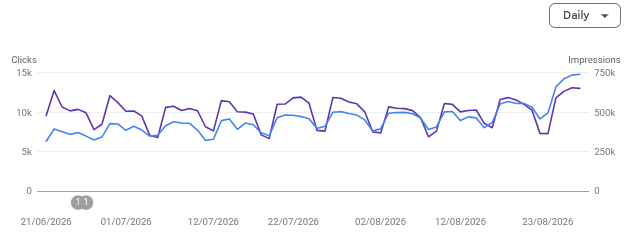
- The traffic decline has been stopped and organic traffic is rising again.
- At the time of writing in late August 2026, the site received just over 14,000 clicks in one day, more than double the clicks from a low point of just over 6,000 in late June.
Crawlability
Now we’ll move on to maintaining your website’s SEO based on Google fundamentals and best practices.
Crawlability is whether search engine bots, also called crawlers or spiders, can find and access your site’s pages in the first place.
- Robots.txt: this file tells bots which parts of a site they should or should not crawl. Misconfigured robots.txt files are a common cause of pages disappearing from search results entirely, often because a disallow rule blocks an entire section by accident.
- Crawl budget: search engines allocate a limited number of pages they will crawl on a given site within a given timeframe. This matters most for large sites (typically tens of thousands of pages or more), where wasted crawl budget on low-value pages means important pages get crawled less often.
- Internal linking and site architecture: pages that are well-linked internally get discovered and crawled more easily. A logical hierarchy also helps bots understand which pages matter most.
- Orphan pages: pages with no internal links pointing to them are hard for bots to find, even if they are technically live and included in a sitemap.
- Crawl errors: Google Search Console’s Coverage report flags 404s, server errors and redirect issues that prevent successful crawling.
Check your site’s crawlability and fix the issues to stop them affecting your rankings.
Indexability
Indexability means whether Google actually adds a page it crawls to its search index.
- Index coverage reports: Search Console shows which pages are indexed, excluded, or affected by errors and why.
- Noindex tags: these tell search engines not to index a specific page, useful for thank-you pages, internal search results, or duplicate content that should not compete for rankings.
- Canonical tags: these tell search engines which version of a page is the “master” copy when duplicate or near-duplicate content exists.
- Parameter URLs and faceted navigation: e-commerce and filtered category pages often generate huge numbers of near-identical URLs through filters and sorting options. Without proper handling, this creates duplicate content at scale and wastes your site’s crawl budget.
- Soft 404s: pages that return a 200 status code but display “not found” or empty content confuse search engines and can lead to poor indexing decisions.

Site architecture and URL structure
A logical structure helps both search engines and your website visitors understand how the content relates.
- Flat vs deep architecture: a flatter structure, where important pages sit only a few clicks from the homepage, generally supports better crawling and link equity distribution than deeply nested folder structures.
- URL best practices: URLs should be short and readable and structured to reflect the site hierarchy, with keywords included where they occur naturally.
- Breadcrumbs: these improve user navigation and help search engines understand page hierarchy. They often appear directly in search results too.
- Pagination: paginated series (category pages, blog archives) need a coherent strategy so search engines understand these are the same series and won’t treat each page as a distinct competing piece of content.
XML sitemaps
A sitemap is a file listing the URLs a site wants search engines to crawl and index.
Purpose and best practices: sitemaps should include only canonical, indexable URLs, exclude redirected or noindexed pages and stay updated automatically as content changes.
Dynamic vs static sitemaps: large or frequently updated sites benefit from dynamically generated sitemaps that reflect the current state of the site rather than manually maintained files that go stale.
Sitemap segmentation: sites with tens of thousands of URLs often split sitemaps by content type (products, blog posts, categories) to make monitoring and troubleshooting easier.
Submission and monitoring: submitting a sitemap through Search Console and checking it regularly for errors helps catch indexing problems early.

Site speed and Core Web Vitals
Page speed affects both rankings and conversions. Google now measures it through three specific metrics known as Core Web Vitals.
- Largest Contentful Paint (LCP): how long the main content takes to load.
- Interaction to Next Paint (INP): how responsive the page feels when a user interacts with it.
- Cumulative Layout Shift (CLS): how much the page layout shifts unexpectedly as it loads.
Common causes of poor performance include unoptimised images, excessive JavaScript, render-blocking resources and slow server response times.
Mobile-friendliness
Google now uses mobile-first indexing, meaning it primarily evaluates the mobile version of a site when deciding how to rank it, even for searches performed on desktop.
The latest data from July 2026 shows that 53.37% of searches are on mobile compared to 46.63% for desktop, according to StatCounter’s statistics on desktop vs mobile market share.
Responsive design, where a single set of URLs adapts to any screen size, is generally better than maintaining separate mobile URLs.
Common mobile issues that hurt SEO include text that’s too small to read, buttons appearing too close together, intrusive interstitials and content that loads differently or incompletely on mobile devices.

HTTPS and site security
HTTPS encrypts data between a browser and a server. It has been a confirmed ranking factor for several years.
Beyond rankings, it affects user trust directly, since browsers flag non-HTTPS sites as “not secure.”
Mixed content, where a secure page loads insecure resources such as images or scripts, often undermines the benefits of HTTPS and it can also trigger browser warnings.
You also need to actively manage SSL certificates, because expired certificates can take a site offline in the eyes of both users and search engines.
Structured data and schema markup
Schema markup is code added to a page that explicitly tells search engines what the content means, rather than leaving them to infer it.
Common schema types include markups for:
- Article
- Product
- FAQ
- Breadcrumb
- Review
- Local Business
Implementing schema correctly can generate rich results. These include star ratings, FAQ dropdowns or product pricing directly in search listings, which tend to improve click-through rates even without a change in ranking position.
The standard tools to check your implementation are Google’s Rich Results Test and Schema.org’s own validator.
JavaScript SEO
Sites built on JavaScript frameworks such as React, Vue, or Angular have some rendering issues.
Content that loads dynamically via JavaScript isn’t always visible to search engines in the same way it is to users.
The main approaches are:
- Client-side rendering (content builds in the browser)
- Server-side rendering (content builds on the server before delivery)
- Dynamic rendering (serving a pre-rendered version specifically to bots).
Test how Google renders your page, using tools like the URL Inspection tool in Search Console, to catch cases where important content is missing from what search engines see.

International and multilingual SEO
If you’re targeting different countries or languages, you need to signal clearly which version of a page serves which audience.
Hreflang tags tell search engines which language and regional variant of a page to show users based on their location and language settings.
But common mistakes include missing return tags, where page A points to page B… but B doesn’t point back.
Incorrect language or country codes cause problems too, as do conflicting signals between hreflang and canonical tags.
You can implement targeting through country-code top-level domains (ccTLDs), subdirectories or subdomains. Each has different implications for authority consolidation and maintenance overhead.
Duplicate content and canonicalisation
Duplicate content arises for many reasons: www versus non-www versions of a domain, HTTP versus HTTPS, trailing slashes, session IDs, or printer-friendly page versions.
Canonical tags, 301 redirects and noindex tags each solve this differently:
- A 301 redirect permanently consolidates two URLs into one and passes link equity.
- A canonical tag tells search engines which version to treat as authoritative while leaving both URLs technically live.
- Noindex removes a page from the index entirely.
Which tool you should choose depends on whether both versions need to stay accessible to your visitors. Cross-domain canonicalisation follows the same logic when duplicate content exists across separate domains, such as syndicated content.
Redirects
Redirects tell browsers and search engines that a page has moved.
- 301 signals a permanent move and passes most link equity to the new URL.
- 302 signals a temporary move and is not intended to pass equity long-term.
- 307 is the HTTPS-era equivalent of a 302, also temporary.
Redirect chains (where URL A redirects to B, which redirects to C) slow down crawling and dilute link equity at each hop. Redirect loops break the process entirely. You need to audit both regularly, particularly after site migrations, when you implement large batches of redirects at once.

Site migrations
A site migration, whether it’s a domain change, platform switch, or site restructure, can cause a significant risk to your SEO if you mess it up!
A pre-migration checklist typically covers a full URL inventory, a mapping of every old URL to its new equivalent and a plan for redirects, canonical tags and sitemap updates.
After launch keep tracking your traffic, rankings and crawl errors closely for several weeks, as problems often appear gradually rather than immediately.
Log file analysis
Server log files record every request made to a website, including every visit from search engine bots.
This data reveals information Search Console doesn’t show directly, such as exactly which pages Googlebot crawls, how often and which pages get ignored altogether.
Log file analysis is particularly valuable for identifying crawl waste on large sites. Bots often spend disproportionate time on low-value pages, such as filtered URLs or old paginated archives, at the expense of pages that actually need visibility.
Full technical SEO audit services
A technical SEO audit is a full review of a site’s technical health. The site audit typically covers crawlability, indexability, speed, mobile-friendliness, structured data, duplicate content issues and other technical elements in one pass.
Common tools include Screaming Frog and Sitebulb for crawling and diagnostics, Google Search Console for indexing and performance data and platforms like Ahrefs or SEMrush for broader technical audit modules.
Most sites benefit from a full audit at least twice a year, with ongoing monitoring in between, though sites undergoing frequent changes or migrations may need more frequent reviews.

Technical SEO services
Given this covers a wide range of disciplines, here is a consolidated list of the services that typically fall under a technical SEO engagement:
- Technical SEO audits and health checks
- Crawlability and indexability fixes
- Site speed and Core Web Vitals optimisation
- Crawl budget optimisation for large sites
- Structured data and schema implementation
- Site migration planning and support
- International and multilingual SEO setup (hreflang)
- JavaScript rendering fixes for modern frameworks
- Log file analysis and crawl behaviour reporting
- Mobile-friendliness optimisation
- HTTPS and site security fixes
- Duplicate content resolution and canonicalisation strategy
- Redirect audits and clean-up
Technical SEO tools
Technical SEO makes use of common tools such as:
- Google Search Console: indexing status, crawl errors and performance data direct from Google.
- Screaming Frog: site crawling and technical diagnostics.
- Sitebulb: crawling with a stronger visual reporting layer.
- Ahrefs and SEMrush: broader technical audit modules alongside their keyword and backlink tools.
- PageSpeed Insights and Lighthouse: page speed and Core Web Vitals measurement.
- Log file analysers: tools such as Screaming Frog’s Log File Analyser or Splunk for parsing server logs.

FAQs from our clients about technical SEO
Is technical SEO more important than content?
Neither works well without the other. Strong content cannot rank if search engines can’t crawl or index it properly. A technically flawless site with weak content still won’t rank for competitive terms. They function as prerequisites for each other rather than competing priorities.
How often should we do a technical SEO audit?
Twice a year is a reasonable baseline for most sites, with more frequent checks recommended for large sites, sites undergoing regular changes, or any site that has recently migrated or redesigned.
Can I do technical SEO myself, or do I need a developer?
Some tasks, such as basic sitemap submission or checking Search Console reports, don’t require development skills.
Others, including schema implementation, redirect logic and JavaScript rendering fixes, usually need developer involvement to implement safely without breaking other parts of the site.
How long does it take to see results from technical SEO fixes?
This varies by issue. Fixing a critical crawl error can show results within days, since it directly unblocks indexing.
Site speed or architecture changes tend to show gradual improvement over weeks to months, as search engines re-crawl and re-evaluate the site over time.
UWP Group: a technical SEO agency London and UK firms trust
As a full-service digital marketing agency, we are a technical SEO company that can help you rank better on Google and in AI search – for more details, find out: What is AEO?
We’re an SEO agency in London but we work with companies across the UK and internationally too, take a look at the Google reviews for UWP Group to see what they think of us.
So wherever your business is, our technical SEO consultants can help. Take a look through the UWP Group case studies for many examples of how we’ve helped businesses grow their presence online through SEO.
We hope you found this guide useful. We’ve also written several industry-specific SEO guides including:
If you need a technical SEO specialist, please don’t hesitate to contact us.